Nautilus Custom Icon Name
A Nautilus-python extension for the GNOME desktop that adds enhancements for custom folder icons.
SourceGNOME Files has a nice feature that allows setting a custom folder icon (even though themes don’t tend to include very many). At least it’s easy enough to make your own with tools like Iconic.
That worked pretty well for me when I wanted to give a folder a unique icon to signify its importance in my workflow, or to make finding a specific directory in a long list a bit faster. Any time I needed a new one I’d just download a symbolic icon from Font Awesome, make a new folder icon with Iconic and then set it in Files. Easy!
But then I started using the GNOME Accent Icon extension which lets you sync the folder icon color to the GNOME Accent color. It’s lovely and feels like a native feature of the desktop environment, but this meant I was going to have to remake all of my icons anytime I wanted to change colors.
No problem, I’ll just write a Python script to make each icon in each GNOME accent color. In fact now that I’m automating it maybe I’ll go ahead and make a few extras… Well I got a bit carried away and soon I had my own icon pack add-on with over 150,000 new custom icons.
Now I had all the icons I needed but I still had another big problem: GNOME Files only accepts a static file path for a custom icon which meant that after changing the icon theme I still had to manually update the icons to match the accent color. I thought maybe symlinks would be the answer but after experimenting I found that replacing the symlinked file would not update the custom icon. If I wanted it to work without some sort of painful manual process I was going to have to build a solution myself.
After doing a bit more research I discovered Nautilus Python Extensions, better yet I already had the package and a few extensions installed (courtesy of Bazzitemaintainers). I decided to see if I could use file metadata to specify an icon by it’s theme name and have Nautilus show the correct icon when switching themes (to a matching icon in the new theme).
I’m still pretty new to Python but about 30 lines of code later, I was surprised to find it worked perfectly on the first try! I could set the custom-icon-name metadata in the terminal and the folder icon would update automatically as I switched themes.
This tiny extension was working well and setting icons in the terminal was barely an inconvenience because I already use Ansible to manage most of my workstation config. Even then I thought this was maybe working so well that I wanted to share it! Everyone should be doing it like this! But without a GUI method for selecting icons I knew it would be difficult for anyone to use it.
In true 80/20 fashion this last bit of polish and convenience was by far the hardest part and required another 1,000 lines of code to finish. The icon selection box is built with PyGObject and I’m pretty pleased with how it turned out.
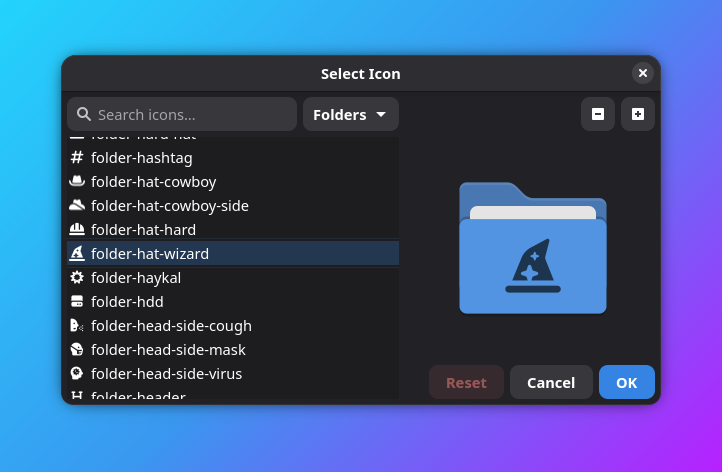
I think it looks nice for a simple tool and feels like a native part of the GNOME ecosystem. It works well across dozens of themes and degrades nicely for those that don’t include full symbolics. I even included a few performance-minded features like a debounce delay in the search to reduce CPU impact when searching very large themes.
I’m hoping to return to this project to maybe package it properly and add multi-language support. If you found this project and want to help, let me know! If you are a GNOME contributor, please steal my ideas and put them in Nautilus!